
Last updated on
Nov 9, 2026
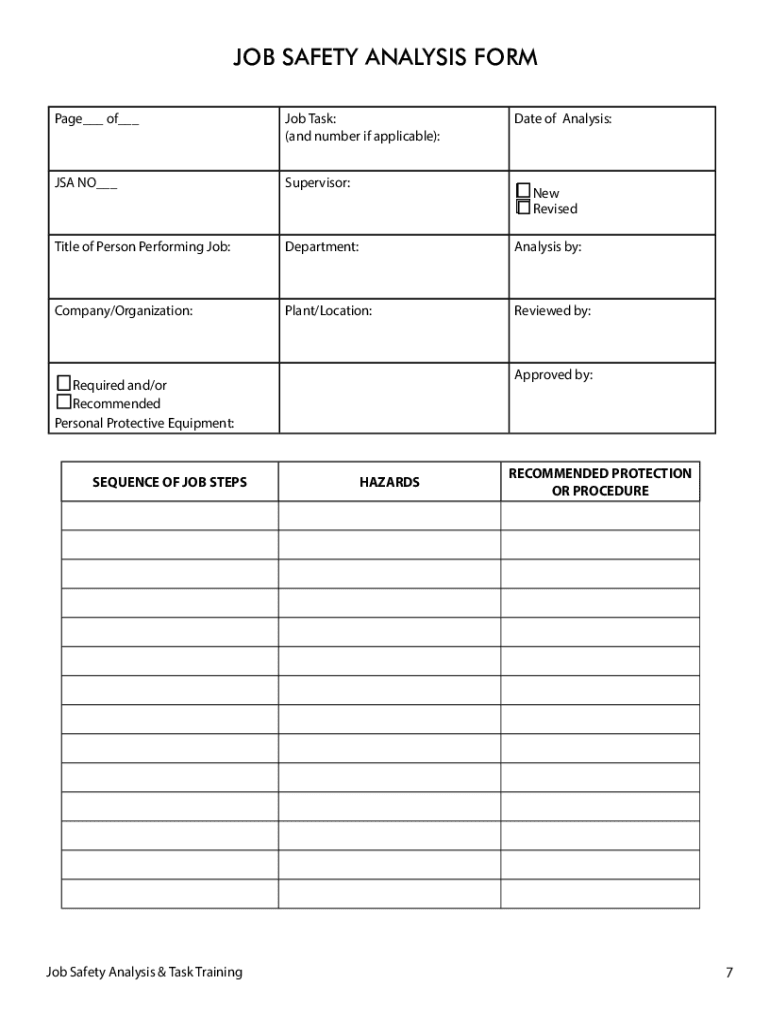
TX HS02-017C 2014-2026 free printable template
pdfFiller is not affiliated with any government organization

Fill out
Complete the form online in a simple drag-and-drop editor.

eSign
Add your legally binding signature or send the form for signing.

Share
Share the form via a link, letting anyone fill it out from any device.

Export
Download, print, email, or move the form to your cloud storage.
Why pdfFiller is the best tool for your documents and forms


End-to-end document management
From editing and signing to collaboration and tracking, pdfFiller has everything you need to get your documents done quickly and efficiently.
Accessible from anywhere
pdfFiller is fully cloud-based. This means you can edit, sign, and share documents from anywhere using your computer, smartphone, or tablet.
Secure and compliant
pdfFiller lets you securely manage documents following global laws like ESIGN, CCPA, and GDPR. It's also HIPAA and SOC 2 compliant.
What is TX HS02-017C
The Job Safety Analysis & Task Training is a guide used by organizations to outline the process of conducting a Job Safety Analysis and provide task training instructions.
pdfFiller scores top ratings on review platforms




Who needs TX HS02-017C?
Explore how professionals across industries use pdfFiller.

TX HS02-017C is needed by:
-
Employers in Texas seeking to enhance workplace safety
-
Supervisors aiming to improve task training protocols
-
HR professionals responsible for employee training programs
-
Safety officers focused on compliance with safety regulations
-
Workers needing clarity on job safety practices
-
Safety trainers developing educational materials
Comprehensive Guide to TX HS02-017C
What is the Job Safety Analysis & Task Training?
Job Safety Analysis (JSA) is a process that helps organizations identify potential hazards associated with specific tasks and implement measures to mitigate these risks. Task Training complements JSA by ensuring that employees are adequately prepared to perform their roles safely and efficiently. This document, provided by the Division of Workers' Compensation in Texas, serves as a crucial guide in workplace safety planning.
The significance of JSA and Task Training lies in their ability to enhance safety, quality, and productivity. By systematically evaluating tasks, organizations can foster a safer work environment, ultimately reducing the likelihood of accidents and injuries.
Purpose and Benefits of Using the Job Safety Analysis & Task Training Form
The primary purpose of utilizing the Job Safety Analysis and Task Training form is to promote a safe workplace and reduce the incidence of accidents. Some advantages include:
-
Enhancing workplace safety through proactive hazard identification and risk assessment.
-
Improving employee awareness and preparedness for potential hazards in their work environment.
-
Facilitating compliance with Texas workers' compensation rules, which can protect organizations from legal complications.
Key Features of the Job Safety Analysis & Task Training Document
The Job Safety Analysis and Task Training document is equipped with essential components designed to streamline the safety training process. Key features include:
-
Detailed steps for preparing a JSA that involve job breakdown and task identification.
-
The critical role of supervisors and trainers in delivering effective task training.
-
Templates and resources that aid users in completing the form accurately.
Who Should Use the Job Safety Analysis & Task Training Document?
This document is primarily beneficial for several key stakeholders in Texas:
-
Employers and safety managers who are responsible for overseeing workplace safety protocols.
-
Supervisors and trainers engaged in the onboarding process of new employees.
-
Workers who need to familiarize themselves with the safety protocols associated with their specific tasks.
How to Fill Out the Job Safety Analysis & Task Training Form Online - Step-by-Step
To successfully complete the Job Safety Analysis and Task Training form using pdfFiller, follow these steps:
-
Access the pdfFiller platform and locate the Job Safety Analysis form.
-
Carefully fill out all required fields, ensuring you gather necessary information about the task and associated risks.
-
Review your entries against the validation checklist to ensure accuracy before submission.
Common Errors and How to Avoid Them When Completing the Form
While filling out the JSA, users often encounter common errors that can hinder the submission process. Here are strategies to avoid these pitfalls:
-
Pay close attention to detail to minimize inaccuracies during data entry.
-
Utilize the features provided by pdfFiller to streamline the filling process and reduce chances for mistakes.
Understanding Submission Methods and Next Steps After Filling Out the Form
Once the Job Safety Analysis and Task Training form is completed, users should consider the following for submission:
-
Different submission methods, whether online via pdfFiller or through alternative channels.
-
A confirmation process to track the submission status and ensure it has been received.
-
Actions to take if corrections or changes are needed post-submission.
Ensuring Security and Compliance for the Job Safety Analysis & Task Training Form
Handling sensitive data in the Job Safety Analysis form requires stringent security measures. Important considerations include:
-
Utilizing the robust security features offered by pdfFiller, such as 256-bit encryption and HIPAA compliance.
-
Maintaining privacy while retaining essential records in accordance with state-specific regulations.
How pdfFiller Helps You Streamline Your Job Safety Analysis & Task Training Process
pdfFiller enhances the efficiency of creating and managing the Job Safety Analysis and Task Training form in several ways:
-
Offers tools for editing, eSigning, and sharing documents seamlessly across platforms.
-
Enables users to accelerate the completion process, providing a more efficient workflow.
-
Encourages new users to create a free account to leverage these powerful tools for their safety documentation needs.
How to fill out the TX HS02-017C
-
1.Access pdfFiller and search for 'Job Safety Analysis & Task Training' to locate the form.
-
2.Open the form by clicking on it, which will display the PDF in the editing interface.
-
3.Before filling out the form, gather necessary information including job details, safety measures, and training protocols.
-
4.Use the toolbar on the left to navigate, adding text or comments where needed by clicking on the form fields.
-
5.Ensure all sections are completed accurately, especially job breakdown and task identification fields.
-
6.Review the form for completeness and accuracy, checking for any required areas that may have been missed.
-
7.Once satisfied with the entries, proceed to save the document by clicking 'Save' in the top right corner.
-
8.You may download the completed PDF to your device or submit it directly through pdfFiller's accessible submit feature.
-
9.Consider printing a hard copy for your records, if required.

Who should complete the Job Safety Analysis & Task Training form?
This form should be completed by employers, supervisors, or safety officers looking to enhance workplace safety and effectively train employees on job safety practices.
Are there any deadlines for submitting this form?
While the Job Safety Analysis & Task Training guide itself does not have formal submission deadlines, it is recommended to complete it as soon as task training needs arise to ensure proper safety protocols are followed.
What methods can I use to submit the completed form?
After completing the form on pdfFiller, you can submit it directly from the platform, download it for printing and submission, or save it for future reference as needed.
Do I need to provide any supporting documents when using this form?
Typically, no additional supporting documents are required for the Job Safety Analysis & Task Training. However, having relevant safety guidelines or training materials on hand may be beneficial.
What common mistakes should I avoid when filling out this form?
Ensure to complete all required fields thoroughly; common mistakes include leaving sections blank or not providing sufficient detail in the job breakdown and task identification parts.
How long does it take to process a Job Safety Analysis?
Processing times for Job Safety Analysis will vary based on organizational policies, but it is advisable to complete and review the document as promptly as possible to maintain safety compliance.
What is the main purpose of the Job Safety Analysis & Task Training form?
The main purpose of the Job Safety Analysis & Task Training form is to guide organizations in assessing safety hazards and providing structured training for tasks, thereby improving safety and productivity in the workplace.
Related Content
Related Forms



Related Catalogs
Get the latest insights from our blog


If you believe that this page should be taken down, please follow our DMCA take down process
here
.
This form may include fields for payment information. Data entered in these fields is not covered by PCI DSS compliance.